

VIDEO TRANSLATION GUIDE
How to translate videos in real time on iPhone
Understand the video while you watch.
Follow courses, interviews and streams in another language. Start with the player’s own captions; when they do not meet your needs, choose a workflow that translates spoken audio during playback.
Choose a method
Choose the right way to translate
CAPTIONS ALREADY AVAILABLE
Use the player’s subtitles
Check its language and auto-translate options first. No extra app may be needed.
YouTube captions not working? →WHILE YOU WATCH
Translate the spoken audio
Caplo listens to available app audio and shows floating translated captions. No video upload in this workflow.
Set up Caplo →TO CREATE A NEW VIDEO
Use a video editing tool
Dubbing or exporting a video with embedded subtitles is a different task, not this Caplo workflow.
Setup
Three steps to start watching
Choose your languages
Select the language spoken in the video and the language you want to read. Match the source language to the speaker, not the app's interface.
Start system audio
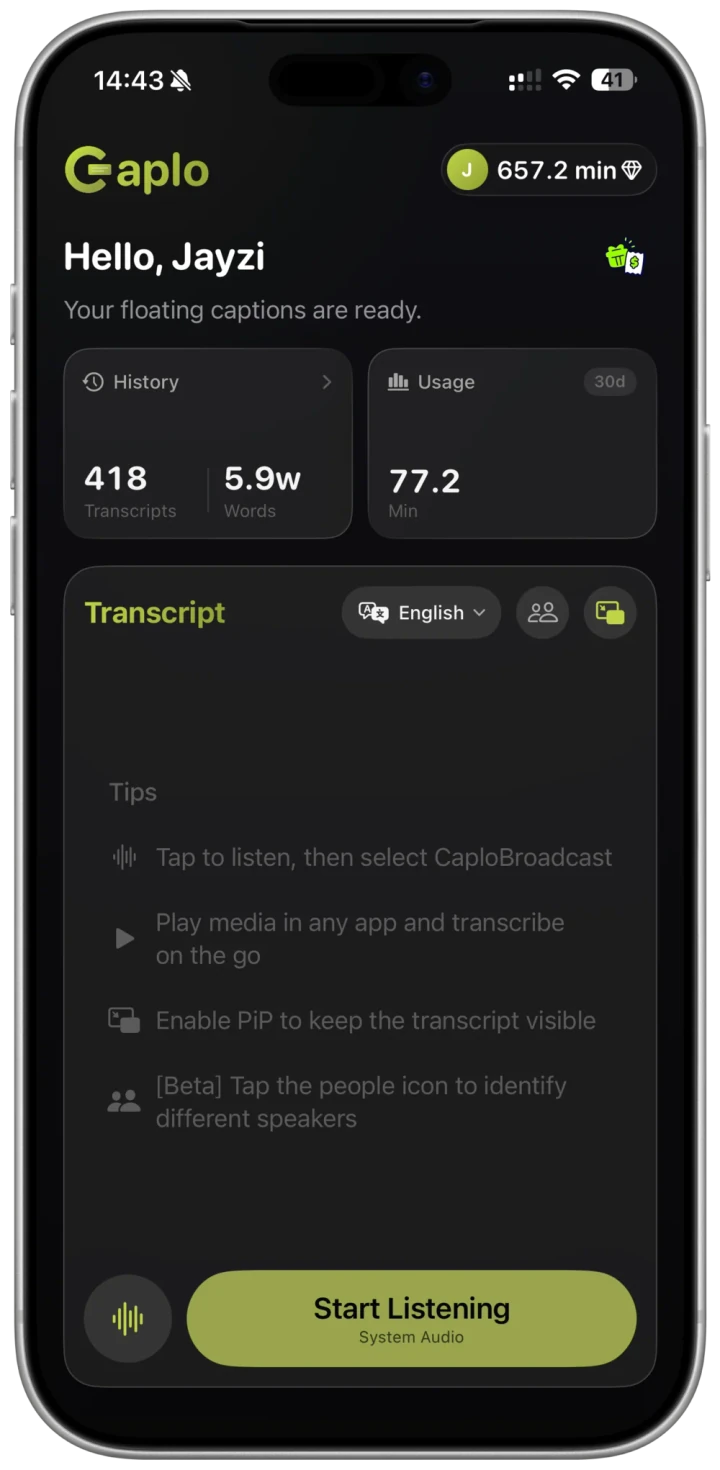
Start listening in Caplo and select CaploBroadcast in the iOS screen broadcast sheet. For a video on this iPhone, use system audio rather than the microphone.
Return to your video and show PiP captions
Play the video and check that Caplo is receiving speech. Enable the floating Picture-in-Picture captions and position them away from the player's controls.
Missing captions
If captions do not appear
- Check the audio mode
- System audio is for a video playing on the same iPhone. Microphone mode listens to your surroundings; it is a different input, not a fix for blocked app audio.
- Check playback and capture
- Confirm that the video is playing, then check the transcript in Caplo. If no speech appears there, check the broadcast session and try a different, unprotected video.
- Check the floating window
- If the transcript appears in Caplo but not over the video, enable PiP captions. Move the window if it covers controls or existing subtitles.
- Check app restrictions
- Some apps and protected media do not pass audio to iOS screen broadcast. Caplo cannot bypass this. Use available official subtitles or another authorized viewing option.
Support & limits
Know what this method can—and cannot—do
For watching, not editing
This guide covers understanding speech while watching courses, interviews, videos and streams. It does not create a dubbed video, translate on-screen text or burn subtitles into a video file.
Not for calls or meetings
Caplo does not support capturing calls or conferencing apps such as FaceTime, Zoom, Microsoft Teams or Google Meet. A recorded talk played as ordinary media is a different scenario, subject to audio availability.
Expect delays and mistakes
Fast speech, music, overlapping voices and names can reduce accuracy. Prefer official subtitles when available, and verify important information against the source.
Check access and usage first
Use content you are authorized to play. Check current device requirements, language availability and remaining minutes in the app before a long session. Stop the broadcast when you finish.
FAQ
Questions about translating video audio on iPhone
Can I translate a video with no subtitle track?
Yes, when Caplo can receive the video's spoken audio. It generates captions from that audio instead of requiring a subtitle file. If the app blocks audio capture, this method will not work.
Do I need to upload the video?
Not for this workflow. Play the video in its original app while Caplo listens through iOS screen broadcast. This does not mean that all recognition or translation processing happens offline.
Can I translate a saved video?
Try playing it in a player that makes audio available to iOS screen broadcast. This guide is about translating playback, not importing a file into Caplo or exporting a translated video.
Does this work on iPad too?
Caplo also supports iPad. The same language, system-audio and PiP workflow applies, with a wider transcript layout. Availability still depends on the source app and media.
Can I keep the transcript afterward?
Caplo provides session history and Markdown transcript export. Review recognition and translation errors before reusing the text. Markdown export is not a subtitled-video export.